Development workflow - November 2026
·
Simon Hartcher's devblog
An update on my development workflow for the month of November 2026
The "best practice" of AI-assisted development is constantly changing. It's also hard to know what process works best. In general, I'm not sure. For me personally, I have been updating my workflow constantly. I am always looking for better ways to work. Measured mostly anecdotally and by feel, but nevertheless I am trying to optimise every day.
For years and years I have been using some form of vim. I'm writing this
post in Neovim. Every IDE or editor I use I have preferred to use Vim bindings.
More recently though, that has not been the case. I'm not writing code by hand
much at all anymore. Agents are writing all of it.
In the future I might like to look back on how my process has changed over the years. Historically I have been terrible at blogging, and to be fair I don't expect much to change. So before I get bored and move on to something else, here is my November 2026 writeup of my daily development workflow.
What am I optimising for? #
At this point it is a surprise to no one that AI-assisted development is a slog. It's truly exhausting at the end of the day if you're not careful, and completely psychotic if you don't put your laptop (or phone) down late into the night to give your brain a rest.
In my work and personal projects it's no different. And the thing that really kills my energy is the constant context switching required to keep agents on task. I can have up to half a dozen tickets on the go at once in a work-day, and if proper care is not taken, I will be under the desk by lunch.
So today my main aim is to maintain my energy throughout the day while keeping the high level of productivity that is expected of a staff-plus software engineer at a high-growth startup.
The stack #
The following tech stack is quite new to me. I only adopted it last week.
One moment please. An elderly man on the train is currently having a very loud conversation with his wife on speaker phone. My train of thought has been completely sidetracked. Please stand by...The wife has had trouble charging her car overnight and is just figuring it out. Also, it is not raining right now. She appears to be quite thankful for that.
They are talking about real estate now. What was I writing about? Oh, right! 💡
Terminal session manager: zmx #
zmx is a fantastic terminal session manager that I generally run headless.
Each harness gets its own session named <repo-name>-<ticket> e.g. foo-bar-123
where foo is the repo and bar-123 is a ticket from Linear (or whatever).
The lifecycle of each session is generally agent managed, though I can always access
them if they get stuck by running zmx attach {name}. I have a Rex
script that allows me to press a hotkey to find, attach or create a zmx session.
Agent coordinator: Plannotator #
Plannotator started as a planning tool only. But recently they have grown it to a suite of tools that I am finding invaluable. It is the most important breakthrough I've had this month with my development process. At its core is Inbox, which is a web service that runs on your computer. It looks like a mail client, but for agents. You can also access it over Tailscale, if you fancy that.
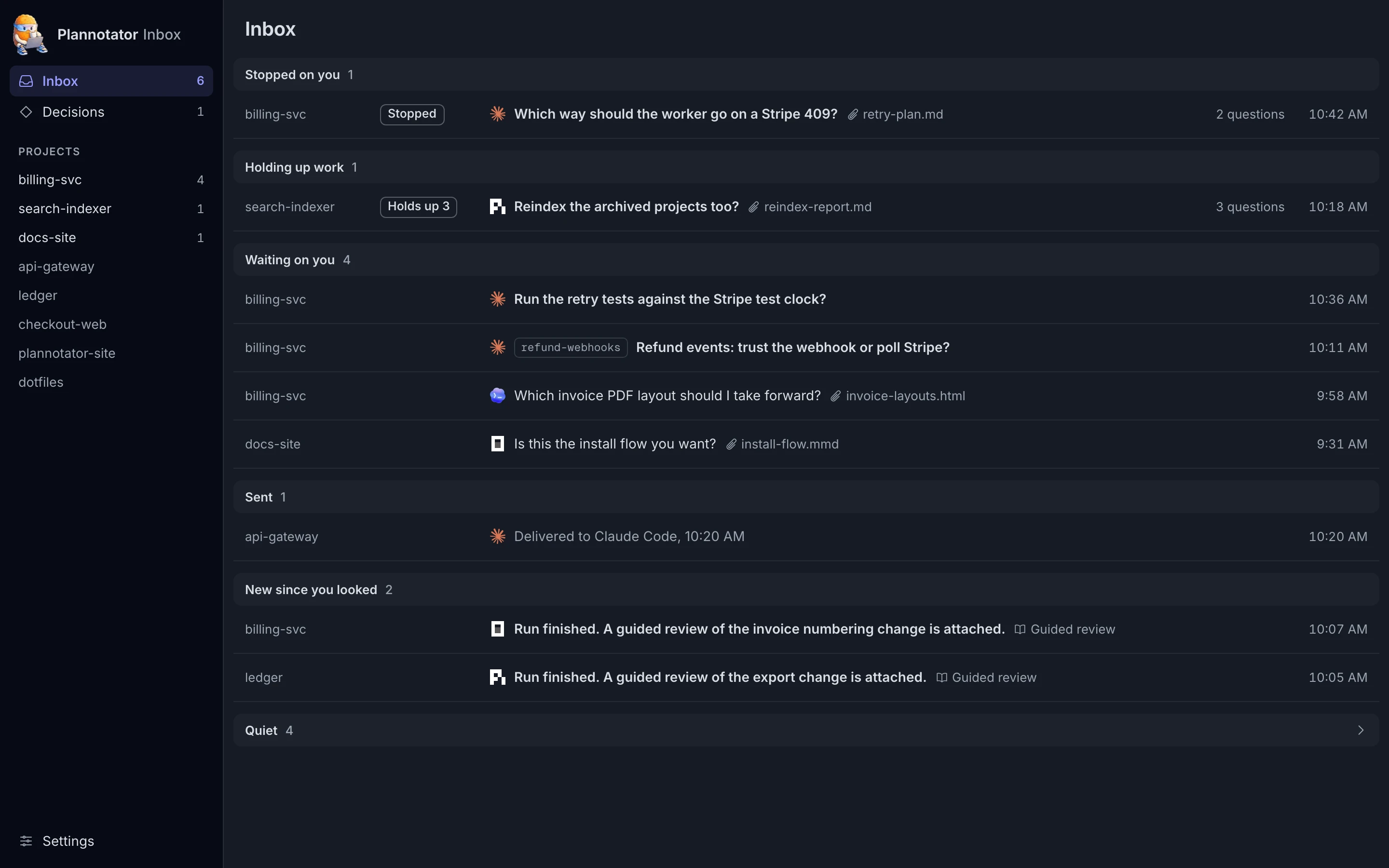
The breakthrough here is that I have found context switching very manageable. I have a manager
agent per repository, and a work agent per ticket. Each agent has its own thread. The manager spins up
worktrees and briefs the work agent on the ticket using my own /plan-and-work skill. The manager
creates a zmx session so that it can monitor the agent for me if needed. When agents need attention,
they send a message to the inbox. They don't automatically refresh, so my focus stays on what I was
already looking at. I love that.
The work agent presents me a plan using Plannotator that we iterate on until I am happy with the work to go ahead. One thing that I put into the work skill is a professional persona. If you've been working with agents long enough you'll remember personas from the before times. The point is that the persona maps well to the task at hand. Part of the brief is presenting the plan in a way that is canonical for that persona. An architect might present a high level architecture diagram or an entity diagram for database changes. A designer could present a wireframe.
Obviously this is all non-deterministic, so sometimes extra guidance is needed, but in general I have seen fewer walls of text and more graphs and diagrams that are easier to grok and faster to approve with confidence.
When the work agent is done on a task it presents using Plannotator's code review. This includes a guide (or walkthrough) of the changes, with two reviews presented at once: one for all the changes, and one for the last patch that it made. Sometimes, reviewing the patch is all I need to see to move forward.
Agent harness: jcode #
Harnesses are a personal thing. What works for me might not work for others. The main thing I like
about jcode is that it isn't Claude Code. I can use whatever provider/model I want with the same settings.
In the workflow I have described it doesn't really matter what the harness is.
The whole point of the workflow I describe here is that agents work in the background, mostly headless,
and I don't have to watch word vomit flying by every second sucking my energy.
Is it working? #
My takeaway is that reducing context switching with Inbox has made a real difference. I'm not completely destroyed at the end of the day. Let's see how I feel a few weeks from now, and what has changed.